English

Views: 0 Author: Site Editor Publish Time: 2026-07-03 Origin: Site


A daily commute can involve navigation prompts, calls, music, messages, and occasional translation, often forcing people to reach for a phone at inconvenient moments. Voice-controlled Smart AI Bluetooth Glasses bring several of those functions into one wearable, combining open-ear audio, microphones, AI assistance, and camera features.
The real question is not whether the glasses can do more, but when they make travel easier without adding distraction. Their value changes between driving, walking, waiting, and riding as a passenger. Understanding those differences helps commuters identify useful features, prepare them before departure, and leave attention-heavy tasks until the vehicle has stopped.
A short call can be awkward when both hands are occupied with luggage, a coffee, a handrail, or work equipment. Smart AI Bluetooth Glasses let the wearer answer through microphones and speakers built into the frame, so the phone can remain in a pocket or bag. That helps with confirming a pickup point, reporting a delay, or receiving a brief family update. The value comes from removing a physical step, not from encouraging long conversations during movement.
Traffic, wind, train announcements, and nearby conversations can interfere with speech, so noise reduction and stable Bluetooth pairing matter. Even with good hardware, extended calls can reduce awareness while crossing streets, boarding transport, or driving. Smart AI Bluetooth Glasses work best when calls are necessary, short, and easy to end.
Frame-integrated speakers provide an alternative to holding a phone or wearing sealed in-ear headphones. Commuters can hear route prompts, music, podcasts, reminders, and selected notifications while keeping their ears physically open. That may make horns, platform announcements, bicycles, or nearby conversations easier to notice. It does not guarantee awareness, since excessive volume can still mask important sounds.
The setting should determine the volume because audio that works beside traffic may be intrusive inside a train carriage. Smart AI Bluetooth Glasses are most useful when alerts are limited and playback remains low enough to preserve awareness. Continuous notifications would simply replace one distraction with another.
Brief, specific AI tasks fit commuting better than long conversations. A wearer might check an appointment before leaving, set a reminder after parking, ask a simple destination question, or translate a short exchange at a station. Voice access avoids unlocking a phone and moving through several screens for every small request. It is especially useful when the user is stationary but has no free hand.
Complex questions should wait until the person is parked or away from moving traffic. AI responses may be incomplete, so they should not replace official transport notices, emergency instructions, or verified traffic information. Smart AI Bluetooth Glasses improve the journey when the request is low risk and easy to confirm.
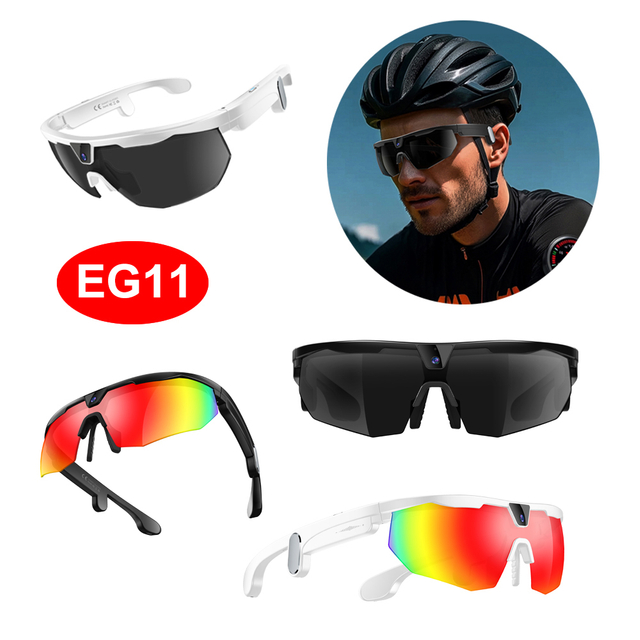
Safe use begins before the engine is engaged. Pair the glasses with the phone, load and review the route, test the volume, check the battery, and mute anything nonessential. Activate a driving or do-not-disturb mode where available, and leave camera and media controls alone. Preconfiguration matters more than hands-free control because it prevents minor setup problems from becoming moving-vehicle tasks.
Once the journey starts, Smart AI Bluetooth Glasses should operate mainly as a passive audio channel. Short route prompts may require less physical handling than reaching for a handset, but they still consume attention. Avoid experimenting with commands simply because the device responds by voice. If the connection drops or an instruction is unclear, pull over safely instead of troubleshooting while moving.
Pre-Drive Checklist
● Pair the phone and glasses.
● Select and review the route.
● Test the audio volume.
● Mute nonessential alerts.
● Leave the camera inactive.
● Confirm enough battery for the trip.
● Identify a safe place to stop if adjustments are needed.
Hands-free operation does not remove visual, auditory, or cognitive distraction. Distracted driving includes any activity that diverts attention from controlling the vehicle, including communication, entertainment, and navigation tasks. Even an activity that does not require holding a device can increase risk if it consumes mental attention. Those principles apply to wearable technology as much as they apply to phones and dashboard screens.
Recording and review functions should remain off while the vehicle is moving. Drivers should not start video, browse stored images, change settings, troubleshoot connectivity, dictate long messages, or begin translation. Extended AI conversations are equally unsuitable because forming questions and evaluating answers competes with road awareness. Smart AI Bluetooth Glasses should never move a phone-based distraction closer to the face.
Wearable navigation can assist drivers while also creating usability and concentration problems. A device may reduce the need to glance down at a handset without eliminating the cognitive effort required to process information. The most useful question is whether a particular function supports the driving task or introduces another demand. Any feature that requires repeated attention should wait until the vehicle is safely parked.
Rules differ across countries, states, driver categories, and employers. Company policies may also be stricter than the law, particularly for commercial drivers or employees using fleet vehicles. Novice drivers can face additional restrictions on communication devices. Before using Smart AI Bluetooth Glasses at the wheel, check the requirements that apply to the route, vehicle, and type of driving involved.
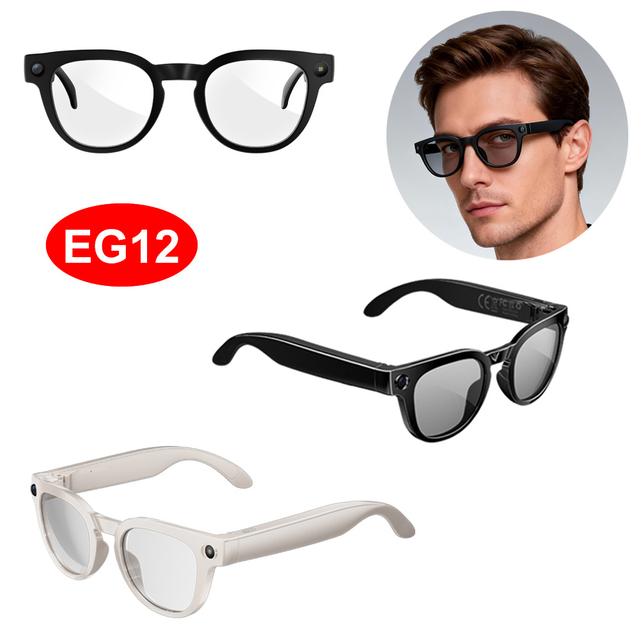
The first and last mile often creates more opportunities for smart eyewear than driving does. A wearer can hear a direction, confirm an address, place a short call, or record a reminder while carrying a bag. Smart AI Bluetooth Glasses reduce repeated phone checks, which becomes meaningful when it happens several times each day.
Walking still demands attention around crossings, stairs, bicycles, and crowded entrances. A one-line prompt may be manageable, while a complicated exchange can make the user miss nearby movement. When a task requires repeated commands or careful interpretation, step aside first. Smart AI Bluetooth Glasses support mobility best when they do not compete with it.
Passengers can use more functions because they are not controlling the vehicle. Music, podcasts, short messages read aloud, translation, schedule questions, and calls are more practical on a bus or train than behind the wheel. Smart AI Bluetooth Glasses also let the phone remain stored in crowded areas. The experience is smoother when the controls are familiar before the trip begins.
Shared transport introduces etiquette concerns. Spoken responses and calls should remain quiet, and microphone performance should be tested in real station noise rather than a silent room. Some operators or workplaces may restrict recording even when ordinary audio use is acceptable. A discreet frame does not remove the obligation to follow posted rules.
Hands-free capture is valuable when it solves a specific problem. After leaving a car, someone could photograph a parking landmark; as a passenger, they might record scenery. Smart AI Bluetooth Glasses make capture quicker, but speed should not override judgment.
Camera-equipped eyewear can make others uncertain about whether they are being recorded. Indicators should remain visible, and permission should be requested in private vehicles, workplaces, meetings, or personal conversations. Avoid close-range filming of strangers, and follow no-recording signs or transport rules. The right default is not “always on,” but “only on when the purpose is clear and the setting allows it.”
Battery planning should cover the morning trip, daytime use, and return journey. Music, calls, AI access, Wi-Fi transfer, and camera recording draw power differently, so playback time cannot predict mixed-use endurance. Smart AI Bluetooth Glasses are convenient only when charging does not become another interruption.
The 4P-Touch EG05 uses a 290 mAh battery and supports more than eight hours of continuous music playback. EG01 uses a 220 mAh battery and provides approximately four hours of music playback with a charging time of about 1.5 hours. Actual endurance still depends on the balance of audio, camera, Wi-Fi, and AI activity.
Reliable pairing matters more than a long feature list. Smart AI Bluetooth Glasses should reconnect predictably, stay linked while the phone is in a pocket or bag, and offer controls that can be recognized without looking. Microphone noise reduction also matters because many calls happen beside traffic. Smart AI Bluetooth Glasses that work only in quiet rooms may disappoint during a real commute.
EG05 includes Bluetooth 5.3, dual-microphone noise reduction, Wi-Fi transmission, and app controls. EG01 combines Bluetooth 4.1, 5 GHz Wi-Fi transfer, ENC noise reduction, voice wake-up, and support for more than 20 languages. These differences reflect different commuting priorities rather than a universal winner.
Electronics are irrelevant if the frame becomes uncomfortable. Check weight distribution, nose pressure, temple width, walking stability, lens options, and prescription compatibility. A longer wear test is more informative than a quick try-on. Smart AI Bluetooth Glasses must succeed as eyewear before their digital functions add value.
EG05 weighs 43.6 grams and supports interchangeable lenses and optional sports ear hooks. EG01 uses a PC and ABS frame with blue-light-blocking lenses, although comfort still depends on face shape and adjustment. The charging case must also fit the bag or pocket used every day.
The strongest feature set depends on the journey. Drivers need reliable audio, rail commuters may prioritize call clarity and translation, and content-creating passengers may care more about camera stability and Wi-Fi transfer. Smart AI Bluetooth Glasses should solve repeated commuting problems rather than occasional novelty.
Commuting pattern | Features to prioritize | Lower-priority features | Main question to ask |
Mostly driving | Reliable audio, simple controls, notification management | Frequent camera use and long AI sessions | Can everything be configured before departure? |
Driving plus walking | Secure fit, voice assistance, audio prompts, battery life | Large internal storage | Will the frame stay comfortable across each stage? |
Bus or train commuting | Call clarity, media playback, translation, discreet controls | Sports accessories | Is the audio useful without disturbing others? |
Frequent multilingual travel | Translation, microphone quality, phone compatibility | Continuous recording | Does the required language pair work reliably? |
Content capture as a passenger | Camera stability, storage, Wi-Fi transfer, charging | Visual-navigation claims | Can recording be used legally and respectfully? |
Start by naming the two or three functions used several times each week. Compare them under realistic noise, battery, fit, and legal conditions. Features that do not solve a recurring problem should carry less weight, however impressive they look online. This keeps Smart AI Bluetooth Glasses focused on practical commuting value.
Smart AI Bluetooth Glasses can make commuting more manageable by reducing repeated phone handling for calls, audio prompts, translation, and brief voice-assisted tasks. Their greatest value appears when users match each function to the situation: broader use while walking or riding as a passenger, and minimal interaction when driving.
Shenzhen Yushengchang Technology Co.,LTD develops smart eyewear that combines Bluetooth communication, AI voice functions, open-ear audio, translation, and hands-free capture. These features can support a more efficient travel routine when the glasses are configured before departure, used responsibly, and selected according to battery life, comfort, connectivity, and everyday commuting needs.
A: They can reduce phone handling, but hands-free use still creates cognitive distraction. Configure audio before departure, avoid messages or recording, and stop safely before changing settings.
A: Legality varies by jurisdiction and device use. Navigation audio may be permitted in some locations, while messaging, video playback, or recording can violate local distracted-driving rules.
A: They can provide calls, audio prompts, music, reminders, translation, and brief AI assistance without repeated phone handling, especially while walking, waiting, or riding as a passenger.
A: Battery life varies by model and activity. Music playback may last four to eight hours, while frequent calls, AI requests, Wi-Fi transfers, and recording reduce runtime.
A: Some smart glasses support prescription lenses, but compatibility depends on the frame and prescription range. Confirm lens replacement options with the manufacturer or an optician before purchasing.
A: Many models can capture photos and video, but users should follow recording laws, transport policies, workplace rules, and reasonable privacy expectations before activating the camera.