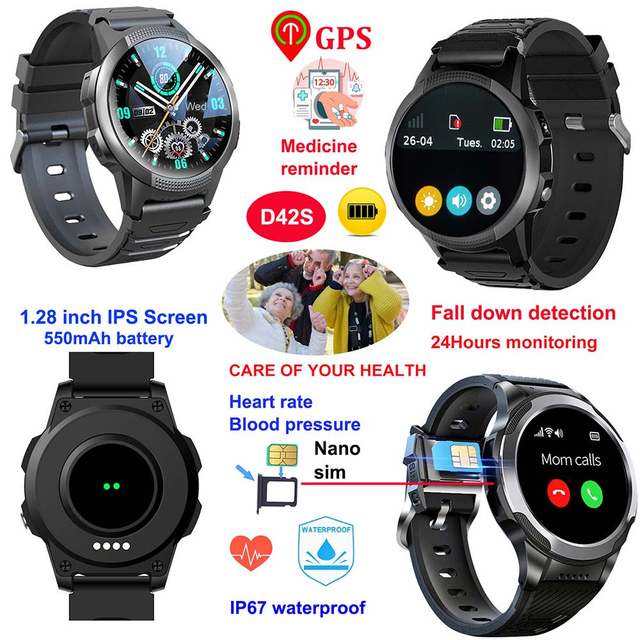
For many aging parents, a smartphone is familiar but increasingly difficult to manage, while a dedicated GPS watch is simpler but more specialized. The easier choice depends less on age than on what the person can reliably carry, see, charge, and operate during an ordinary day or a stressful moment. A Senior Healthcare GPS Watch often wins when the priorities are one-touch help, location awareness, approved contacts, and wrist-based availability. A smartphone remains stronger for flexible communication, larger apps, and users who already manage it confidently. The practical question is not which device has more features, but which one will still be with the user and usable when needed.
Key Takeaways
Choose the device that matches the user's real habits, vision, dexterity, memory, hearing, and willingness to wear or carry it.
A wrist device can reduce the “phone left in another room” problem, while a smartphone may suit a confident user who needs messaging, video calls, transport apps, and other everyday services.
Test emergency actions, charging, calls, location updates, and caregiver notifications before relying on either option.
Neither device guarantees safety or replaces personal care, emergency services, or professional medical advice.
The Short Answer: Simplicity Usually Favors the Watch
A dedicated senior watch usually has a narrower job. It may provide time, calling, an SOS control, location functions, reminders, and selected alerts. A smartphone is a general-purpose computer with notifications, passwords, application updates, menus, advertisements, and many possible ways to leave the screen required for an urgent task. That flexibility is valuable for some people and exhausting for others.
The watch advantage becomes clearest when the older adult frequently misplaces a phone, forgets to take it on short walks, struggles to unlock it, or cannot navigate from the home screen to a contact under pressure. A correctly fitted wrist device is visible and physically attached. An SOS action can be easier to rehearse than unlocking a phone, finding an app, choosing a contact, and explaining a location.
However, “simpler” is not automatically “better.” A wearer may dislike watches, remove one at night, find the strap uncomfortable, or accidentally press side controls. A small display may be harder to read than a smartphone set to large text. A person with tremor may find a physical watch button useful, while another may struggle with a compact touchscreen. The comparison must therefore be made with the intended user, not for an abstract category called “the elderly.”
The broad Senior Healthcare GPS Watch range illustrates why buyers should compare interface, connectivity, battery, alert, and wearing options rather than treating all senior wearables as identical. The right configuration depends on the care setting and the actions that matter most.
Usability Starts Before an Emergency
Emergency performance is built from ordinary routines. If a device is confusing on a calm Tuesday afternoon, it will not become easier during a fall, a moment of disorientation, or a stressful call. Evaluate the entire daily loop: putting on the device, reading the screen, answering an approved caller, returning to the main display, checking battery status, and placing it on charge.
Smartphones often create friction through accumulated complexity. A well-meaning relative may install remote-care, messaging, health, transport, banking, and entertainment applications. Each app can add permissions, updates, account prompts, and notifications. The home screen gradually becomes harder to scan. Operating-system changes can move controls or alter familiar behavior. Biometric unlocking may fail when a finger is wet, and a passcode may be forgotten precisely when the user is anxious.
A dedicated watch can limit these branches. That does not mean it requires no learning. The wearer must recognize the difference between a short press and a long press, know how to answer a call, and understand what an alert means. Caregivers must know how to configure contacts and what to do when a notification arrives. The smaller function set makes this training more focused.
Good onboarding uses demonstration, repetition, and observation. Ask the parent to perform the action without coaching after it has been demonstrated. If they hesitate, redesign the setup or choose another device. Do not interpret a polite “yes, I understand” as proof of reliable use. Run the same test while seated, standing, outdoors, and in the rooms where the person spends the most time.
Watch and Smartphone Comparison for Real Care Situations
Decision factor
Senior healthcare GPS watch
Smartphone
What to test
Availability
Worn on the wrist when accepted and fitted correctly
May be in a bag, on a charger, or in another room
Is the device present during bathroom visits, gardening, walks, and sleep?
Emergency action
Often a dedicated SOS button or simplified flow
Usually requires unlocking, navigation, or voice-assistant use
Can the user start help in one calm, repeatable sequence?
Screen and controls
Fewer choices, but a smaller display
Larger display with adjustable text, but more menus
Can the user read status, answer, and recover from the wrong screen?
Communication
Focused calling with configured contacts
Calls, texts, video, email, and many apps
Which methods does the parent actually use without assistance?
Location support
Designed around wearable tracking and caregiver access
Location sharing depends on settings, apps, power permissions, and account state
Does location update in the home, on routine routes, and after rebooting?
Charging
Smaller battery; simple routine is essential
Often daily charging, depending on use and model
Can the user align the connector and recognize active charging?
Distraction and scams
Fewer apps and fewer unsolicited interactions
Greater exposure to unknown calls, messages, links, and prompts
Can contacts and permissions be restricted without blocking needed use?
Flexibility
Purpose-built and intentionally limited
Broad services and accessibility settings
Are extra smartphone functions useful enough to justify the complexity?
This table should guide a trial, not decide the purchase on its own. A highly independent 78-year-old who manages travel, payments, and family video calls may find a smartphone easier because it is already part of life. A 68-year-old with memory impairment may benefit from a more constrained device. Functional ability, routine, and acceptance are more informative than chronological age.
Carrying Behavior Is Often the Deciding Factor
Location features work only when the device travels with the person. Smartphones regularly fail this basic test because they are placed on furniture, left charging, buried in a handbag, or deliberately left behind during a short trip. Family members may assume the location represents the parent when it actually represents the phone on the kitchen counter.
A watch changes that relationship by attaching the device to the wearer. This can make it more practical for walks, shopping, gardening, and movement around the home. It can also make battery and network status more visible. Yet wear compliance must be observed. Some people remove a watch because of skin sensitivity, swelling, sensory discomfort, fear of damage, or unfamiliarity. A loose strap may rotate the screen away from view; a tight strap may discourage use.
Run a one- or two-week trial whenever possible. Note when the device is removed, when charging is forgotten, and which functions prompt questions. Avoid turning the trial into surveillance. Explain what data is available, who can see it, why it is being used, and how long it is retained. Consent and dignity affect whether the parent will keep using the device after the novelty disappears.
Emergency Calling: Fewer Steps Matter
During an urgent event, fine motor control, attention, and recall can deteriorate. A familiar sequence with one obvious control may be easier than a multipurpose interface. A Senior Healthcare GPS Watch may provide an SOS workflow that calls or alerts configured contacts. The family still needs to verify how the specific model behaves: whether the control requires a long press, which contact is tried first, what happens when there is no answer, whether location accompanies the alert, and whether accidental activation can be cancelled.
A smartphone can also support emergency calling through lock-screen controls, voice assistants, accessibility shortcuts, or emergency contact features. These can work well for someone who already uses the phone comfortably. The weakness is configuration drift. An update, changed permission, disabled mobile data setting, or forgotten account credential can interfere with an app-dependent process. Caregivers should test after major updates rather than assuming the setup remains unchanged.
Whichever device is chosen, create a response plan. Decide who receives the first alert, who serves as backup, and when emergency services should be contacted. Confirm that caregivers recognize the incoming notification and can access location information. A signal is only the start of the response; the device cannot assess the seriousness of an injury or guarantee that help arrives.
Location Accuracy Is Not a Single Number
Families may ask which device is “more accurate,” but location performance changes with environment and technology. Satellite positioning generally performs better with a clear view of the sky. Indoors, dense building materials and surrounding structures can weaken or reflect signals. Wi-Fi and cellular information can add useful context, but the displayed point may still vary. Update interval, network coverage, device power settings, cloud processing, and application permissions also affect what the caregiver sees.
The useful test is scenario based. Check the home, building entrance, lift lobby, garden, nearby shop, regular walking route, and other meaningful locations. Observe how long the system takes to show a new position and how the app labels uncertainty. Test after the device has been stationary and after it has moved. Do not interpret one map point as proof that a person is safe or in a particular room.
The D41WiFi elderly GPS tracker watch combines cellular service with Wi-Fi support and multi-mode positioning for homecare-oriented use. Its product information also describes a simplified interface, an SOS control, two-way calling, fall alerts, geofencing, reminders, and health-related sensors. These functions require correct configuration and real-world testing; health readings and fall alerts should never be treated as diagnosis or guaranteed emergency protection.
Charging and Battery Routines Determine Reliability
People often compare advertised battery capacity while overlooking daily energy demand. Voice calls, weak mobile signal, frequent location updates, screen time, alerts, temperature, and network switching can all change runtime. A device with a larger battery can still fail if it is not placed correctly on the charger. A device with shorter runtime may work reliably if charging is integrated into a consistent routine.
Choose a charging location that is visible, dry, and easy to reach. Avoid placing the charger where the cable creates a fall hazard. Mark the correct connector orientation if necessary. Ask the parent to demonstrate that they can tell the difference between “connected to the cable” and “actively charging.” If a caregiver manages charging, assign responsibility instead of assuming anyone nearby will notice.
For a watch worn at night, charging may fit breakfast or a seated afternoon period. For a smartphone used for evening calls, overnight charging may be more natural. The schedule should preserve coverage during the times of greatest concern. Enable low-battery alerts when available and decide who will respond to them.
Privacy, Autonomy, and Acceptance
A technically easy device can still be emotionally difficult. Continuous location access may feel protective to one person and intrusive to another. The parent should be part of decisions about who can view data, when checks are appropriate, and what events justify a call. Access should be limited to people with a genuine care role, and credentials should be updated when responsibilities change.
Smartphones may contain highly sensitive messages, photos, financial applications, browser history, and contacts. Remote support can expose more personal information than caregivers intend to manage. Dedicated watches usually collect a narrower data set, but location, contact, voice, and health-related data still deserve careful protection. Review account security, permissions, data practices, and local privacy obligations before deployment.
Autonomy also means tolerating reasonable independence. Geofences and repeated location checks should not become a substitute for communication. Configure only alerts that have a clear purpose and response. Too many notifications can produce alarm fatigue, while overly broad restrictions may cause the wearer to abandon the device.
Who Should Choose a Senior Watch?
A dedicated watch is often the easier option when the parent wants a small set of consistent functions, frequently leaves a phone behind, can tolerate a wrist device, benefits from an obvious SOS control, or needs caregiver-managed settings. It can also suit families that want approved communication and location context without installing and maintaining several smartphone apps.
A smartphone may be easier when the parent already uses it confidently, depends on messaging or video calls, needs a larger adjustable display, uses accessibility tools, and reliably carries and charges it. Removing a familiar phone in favor of a new wearable can create more friction than simplifying the existing phone. In some households, the best answer is both: a phone for rich daily communication and a watch for wrist-based availability. That combination increases charging and account-management duties, so it should be adopted only when the roles are clear.
Before ordering devices for a group, distributors and care organizations should conduct a supervised pilot. Include users with different visual, hearing, cognitive, and dexterity needs. Record task completion rather than subjective impressions alone. 4P-Touch presents senior wearables with different feature combinations, so procurement should match the device to the care workflow instead of assuming a single model fits every user.
A Practical Five-Task Trial
Give the intended user five tasks: put on the device correctly, answer an approved call, start an emergency action, identify battery status, and connect it to the charger. Observe without stepping in immediately. Then repeat the tasks after several days. A device is a stronger candidate when the person can complete the actions consistently, understands what will happen next, and is willing to keep it nearby.
Next, test the caregiver side. Trigger a planned alert, verify the contact order, open location information, place a return call, and document the escalation path. Repeat the test in weak-signal areas and after restarting the device. Review false alerts and missed events without blaming the user. Each problem should lead to a setting change, training change, or device-choice decision.
Finally, ask a simple question: does the system reduce or add daily burden? If the parent worries about every notification or the caregiver spends hours fixing accounts, the design is not yet easy. Ease of use includes the whole care network, not just the screen on the wrist.
Conclusion
A Senior Healthcare GPS Watch is generally easier than a smartphone when an aging parent needs a small number of dependable actions, keeps the watch on, and benefits from caregiver-managed settings. A smartphone is easier when it is already familiar, reliably carried, and needed for broader communication and services. Choose through observation, not feature count: test wearing, calling, SOS use, location behavior, charging, privacy, and caregiver response in real settings. 4P-Touch, the brand of Shenzhen Yushengchang Technology Co., Ltd., offers multiple senior-watch configurations, but the successful choice is the one the individual accepts and can use consistently within a tested human care plan.
FAQs
Is a Senior Healthcare GPS Watch easier to use than a smartphone?
It often is for a person who needs calling, SOS, location, and reminders without many apps or menus. A smartphone may remain easier for a confident existing user who values a larger screen and broader communication. Test both with the intended user.
Can an elderly GPS watch replace a smartphone completely?
Sometimes, but only when the user's needs fit the watch's supported functions. A watch may not replace video calling, long messages, transport apps, banking, or web access. Define the required daily tasks before deciding.
Will a GPS watch always show an exact indoor location?
No. Satellite, Wi-Fi, and cellular location methods have different limits, and indoor structures can reduce accuracy. Test meaningful locations and treat map information as context rather than proof of a person's exact room or condition.
What if an aging parent refuses to wear the watch?
Ask why. Strap comfort, appearance, privacy concerns, charging difficulty, or fear of monitoring may be the real issue. Address the concern and offer choices. A device that is not accepted will not provide reliable support.
How often should caregivers test the SOS function?
Test during setup, after major setting or network changes, and on a regular schedule appropriate to the care plan. Notify all recipients that the test is planned, confirm the alert path, and document any change needed.
Is fall detection on a watch guaranteed to identify every fall?
No. Automatic detection can miss some events and can also create false alerts. It should support, not replace, an SOS option, regular contact, environmental risk reduction, and an agreed escalation process.