A fall detection watch should be judged by the complete response it supports, not by a feature label. Caregivers need to check whether the watch is worn correctly, whether its sensors and algorithm suit the user, how it handles suspected falls, where alerts go, how quickly someone responds, and what happens when automatic detection misses an event. A Senior Healthcare GPS Watch can add useful location, calling, SOS, and caregiver notifications, but it cannot confirm injury or guarantee rescue. The safest evaluation combines supervised testing, a manual help option, dependable connectivity, a charging routine, privacy agreement, and a written escalation plan that people can follow under pressure.
Key Takeaways
Automatic fall detection can produce both missed events and false alerts, so pair it with an accessible SOS control and regular human contact.
Test fit, normal daily movements, alert delay, cancellation, call sequence, location behavior, mobile and WiFi coverage, app notifications, and battery endurance.
Decide who responds first and who provides backup. Review the system after medication, mobility, residence, network, caregiver, or device-setting changes.
A wearable supports care; it does not replace emergency services, clinical assessment, home fall-risk reduction, or the older adult's consent.
Start with the Care Scenario, Not the Feature List
“Fall risk” describes many different situations. One person may be unsteady when rising from bed. Another may walk outdoors independently but have occasional dizziness. A person with cognitive impairment may wander and be unable to explain a location. Someone using a walking aid may make movements that look unusual to a sensor but are normal for that individual. The appropriate watch setup depends on these details.
Write down the moments that concern the family. Include where they happen, who is normally nearby, what the wearer can do independently, and how quickly assistance could realistically arrive. Then decide which device functions support those moments. Automatic detection may be valuable for a person who could become unconscious or unable to press a button. A large SOS control may be more dependable for someone who remains aware and can initiate help. Two-way calling can help a caregiver assess the situation, while location information can guide a responder when the wearer is away from home.
Do not frame the device as a promise that falls will be prevented or always detected. It is one layer in a care system. Lighting, footwear, mobility aids, medication review, vision care, home hazards, strength and balance support, and professional assessment may be equally or more important. The watch is most useful when it shortens the gap between a concerning event and a human check.
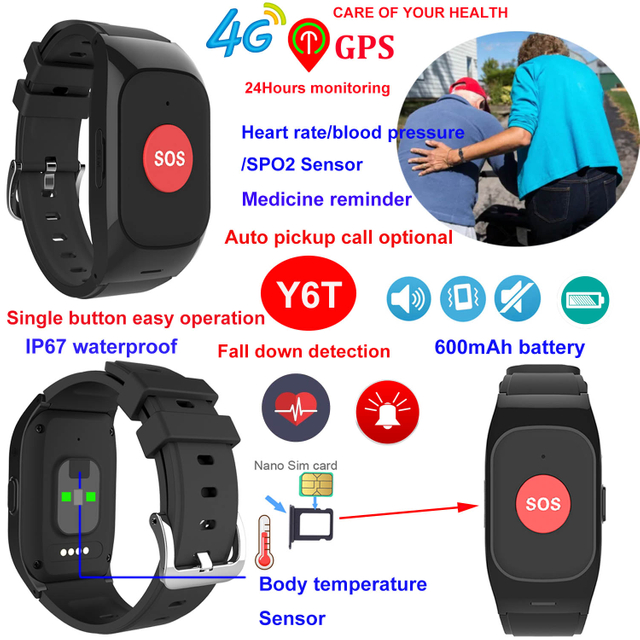
The verified senior healthcare GPS watch collection includes models with different combinations of fall alerts, SOS, communication, location, health-related sensors, reminders, and battery designs. A caregiver should map those options to the person rather than buying the longest specification list.
Understand What Automatic Fall Detection Can and Cannot Do
Wearable fall detection commonly evaluates motion captured by sensors such as accelerometers. A rapid change, impact-like pattern, orientation change, and reduced movement afterward may contribute to an alert decision. The exact algorithm, thresholds, and timing vary by product and software. A watch does not “see” a fall in the way a person does; it classifies sensor patterns.
That creates two unavoidable error types. A false negative occurs when a real fall is not detected. Slow slides from a chair, a controlled descent, a collapse without a strong impact, or movement cushioned by furniture may not match the expected pattern. A false positive occurs when an ordinary action resembles a fall. Dropping the arm quickly, striking a surface, vigorous exercise, taking off the watch, or certain mobility-aid movements may trigger concern.
Caregivers should ask what happens after a suspected event. Does the watch vibrate or sound? Is there a countdown during which the wearer can cancel? Does it call contacts, send an app alert, transmit location, or use several steps? What happens if the first contact does not answer? Can the wearer speak through the watch? Is the most recent location clearly time stamped?
The answers determine whether the detection feature fits the response system. A sensitive algorithm may catch more events but create more false alerts. A less sensitive one may be quieter but miss lower-impact falls. There is no universal setting that eliminates this trade-off.
Caregiver Evaluation Table
Check
Why it matters
How to verify safely
Red flag
Wrist fit and wearing position
Loose or inconsistent placement can change motion data and access to controls
Fit the strap according to guidance and observe daily comfort
The wearer removes it often, cannot reach the button, or develops irritation
Manual SOS
Automatic detection may miss a fall
Practise the exact press action while seated and standing
The sequence is confusing or requires too much strength or precision
Detection workflow
Alert delay and cancellation affect response
Use the manufacturer's safe test method; never stage a dangerous fall
Caregivers cannot explain when an alert is sent or how it is cancelled
Contact sequence
An unanswered first call can delay help
Trigger a planned test and follow the entire chain
Only one recipient is configured or backup responsibility is unclear
Voice connection
Conversation can add context after an alert
Test speaker and microphone in quiet and noisy rooms
The wearer cannot hear, answer, or understand the call
Location information
Responders need useful context when the wearer is away
Test home, entrance, garden, routine route, and indoor transitions
The app hides timestamp or users assume room-level precision
Network coverage
Alerts require a working communication path
Test each meaningful location and after moving between WiFi and cellular coverage
Repeated offline periods or unrecognized loss of service
App notifications
Phone settings can silence a valid watch alert
Lock the caregiver phone and run a planned alert
Notifications depend on an app being open or are blocked by phone settings
Battery and charging
A discharged watch cannot detect or communicate
Run a realistic multi-day test and rehearse charging
Battery frequently reaches critical level or charging is difficult
Privacy and access
Location and health-related data are sensitive
Review users, passwords, permissions, and consent
Shared accounts, unnecessary access, or monitoring without agreement
This table is a starting framework. Add user-specific checks from a clinician, occupational therapist, care organization, or local emergency plan when appropriate. Do not perform deliberate falls to prove detection. Use supported test procedures and safe simulated motions only.
Check the Manual SOS Path First
Automatic detection attracts attention, but the manual help path may be more controllable. The wearer needs to find the control by sight or touch, understand how long to press it, and recognize confirmation that the request started. If a long press is required, verify that arthritis, weakness, tremor, or reduced sensation does not make it impractical.
Practice when the person is calm. Explain who will receive the alert and what the first responder will do. Repeat the action after several days without coaching. If the user cannot perform it, look for a better control design or adjust the care plan. A printed reminder near the charging point can reinforce training, but it does not help when the person is away from home.
Consider accidental activation. A cancellation period can reduce false dispatches, yet it must be understandable. Caregivers should respond kindly to false alarms; fear of “causing trouble” may lead the wearer to stop using the watch or cancel a real event. Review patterns instead of blaming the person.
Verify Alert Delivery from Watch to Human
A watch may successfully identify an event while the response still fails. The mobile network could be unavailable, the caregiver's phone could suppress notifications, the app session could expire, or the first contact could be driving. Test the chain end to end.
Start with named roles. Assign a primary responder, a backup, and a rule for escalating to local emergency services or another nearby contact. Confirm time zones and availability if family members live elsewhere. A distant relative may be well placed to coordinate but unable to reach the home quickly. Include a neighbor or care provider only with consent and a clear role.
During a planned test, place caregiver phones in their normal states: locked, on the usual sound profile, and connected as they would be during the day or night. Check whether the alert is visible and distinctive. Confirm that location opens, the time of the last update is shown, and a return call can be made. Test what happens if the primary person does not answer.
Document the result in plain language. “Alert received” is insufficient if no one knows the next step. A useful protocol might say: call the wearer immediately; if there is no answer, call the nearby responder; if injury is reported or circumstances indicate urgent risk, contact the appropriate emergency service; provide the last known location and access information. Adapt the protocol to local services and professional guidance.
Test Coverage and Location in Real Places
A Senior Healthcare GPS Watch may combine satellite, WiFi, and cellular-based location methods. Each behaves differently. Satellite positioning usually benefits from open sky. Indoors, signals can be weakened or reflected. WiFi and cell information can add context but may be approximate. The app may display a point that is old, uncertain, or based on a different method than the caregiver assumes.
Walk through meaningful locations with the wearer during a supervised trial: bedroom, bathroom, stairs, garden, building entrance, lift, parking area, nearby shops, and regular routes. Check connection status, voice quality, alert delivery, and location updates. Test at the times the person normally uses those areas because network load and household behavior can change conditions.
The D41WiFi elderly homecare watch supports cellular and WiFi connectivity, multi-mode positioning, SOS, two-way voice calls, geofencing, and fall-related alerts. Its product information lists an 800mAh battery and three to four working days in normal use. Those figures and functions should be verified under the final settings and local network conditions; they do not establish that a fall will be detected or that a displayed location is exact.
If the home has weak cellular coverage, confirm how supported WiFi behaves and how the watch transitions when the wearer goes outside. After a router or password change, retest the connection. If the person moves to another home or care facility, treat it as a new deployment rather than assuming the old setup still works.
Fit, Comfort, and Daily Wearing Are Safety Variables
The most sophisticated detection algorithm cannot help when the watch is on a bedside table. Ask whether the strap is comfortable, whether swelling varies during the day, whether the clasp can be managed, and whether the watch interferes with clothing or mobility aids. Inspect the skin according to appropriate care guidance, especially for a wearer with fragile skin, reduced sensation, or circulation concerns.
Consistency matters for sensor interpretation and control access. A watch worn loosely, on different wrists, or over clothing may behave differently. Follow product guidance for placement. Do not overtighten the strap in an attempt to improve detection.
Water resistance also needs realistic interpretation. A product rating does not justify every water exposure, and resistance can change with damage or wear. Verify the manufacturer's instructions before showering, bathing, swimming, or exposing the watch to soap and hot water. Bathroom falls are a concern, but an unsuitable water-use assumption can damage the device.
Observe removal patterns. Some people take a watch off at night, during washing, or when confused by vibration. If risk is high during those periods, the care plan needs another layer, such as environmental changes, scheduled checks, or an appropriate home alert system.
Battery Readiness and Charging Ownership
Fall detection, voice communication, location updates, screen use, alerts, and weak network conditions all consume energy. Advertised runtime is only a starting point. Test with the chosen location interval, normal call behavior, enabled sensors, actual coverage, and real alert settings.
Assign charging responsibility. If the wearer handles it, verify that they can align the connector, recognize active charging, and return the watch to the wrist. If a caregiver handles it, specify when and how battery status is checked. Configure low-battery notifications where available and give them a response owner.
Choose a charging window that does not coincide with the highest-risk unsupervised period. A watch removed overnight may create a gap for someone who gets up frequently. Daytime charging during a meal or supervised rest may be better, but only if it becomes a reliable habit. Keep the cable away from walking paths.
Review battery trends. Shorter runtime may reflect weak coverage, more frequent updates, longer calls, new settings, firmware changes, damaged contacts, temperature, or battery aging. Investigate the change instead of simply disabling useful functions.
Reduce False Alerts without Hiding Real Risk
False alerts can cause fatigue. Caregivers may begin responding slowly, while the wearer may feel embarrassed and stop wearing the device. The solution is not to assume every alert is meaningless. Record the context: what movement occurred, how the watch was worn, whether it was removed, and whether the setting had changed.
Look for patterns. If alerts occur during a specific exercise, dressing task, or abrupt arm movement, discuss safe adjustments supported by the product. If a cancellation step exists, confirm the wearer can use it. If sensitivity can be changed, balance false alerts against the risk of missing lower-impact events and follow vendor guidance.
Missed events require the same discipline. Note the type of fall or slide, body movement, landing surface, watch position, and network state without recreating the incident dangerously. Contact product support if behavior differs from documented operation. Maintain other ways to request help and never describe a settings change as guaranteeing detection.
Privacy and Consent Belong in the Checklist
Location tracking and health-related information affect dignity. Explain which information the watch collects, who can access it, when caregivers will check it, and how alerts change that routine. Seek the older adult's informed agreement wherever possible and follow applicable legal, care-facility, and safeguarding requirements.
Use individual accounts where supported, strong credentials, and the smallest practical access group. Remove access when a caregiver's role ends. Avoid sharing screenshots or location details casually in family chats. For care organizations, document administrators, retention expectations, device assignment, and handover procedures.
Consent is an ongoing conversation. A person may accept emergency location access but dislike routine checking. Agree on boundaries. If cognitive capacity is a concern, obtain appropriate professional or legal guidance rather than assuming family preference is sufficient.
When a Different Device or Additional Layer Is Needed
A wrist watch may not suit a person who removes it repeatedly, cannot tolerate the strap, cannot hear the speaker, or cannot perform the manual SOS action. A pendant, home-based call system, phone accessibility setup, environmental sensor, or scheduled in-person support may be more appropriate. Some people benefit from more than one layer, but each added system creates charging, account, and response responsibilities.
Consider whether the responder can reach the wearer. A GPS point and voice call may be valuable outdoors, while a home system with a local response service may be stronger for someone living alone. In a care facility, staff workflow and approved technology policies may determine what is useful.
4P-Touch also lists a D45Pro fall-alert tracker watch within its senior range. Product comparison should examine the final market configuration, network compatibility, alert workflow, interface, battery, fit, and platform—not only whether “fall detection” appears in the title.
Recheck after Every Meaningful Change
A setup that worked last month may fail after a new phone, app permission change, router replacement, SIM change, operating-system update, caregiver handover, or move to another residence. Create a short retest schedule. Include SOS, automatic-alert workflow, notification receipt, voice call, location timestamp, WiFi and cellular transition, battery alert, and charging.
Reassess the person's needs after a new fall, illness, medication change, mobility change, cognitive change, or new care arrangement. The purpose is not to make a medical judgment through the watch. It is to ensure the device and response plan still match the situation described by the person's qualified care team and family.
For group programs, maintain configuration records by device and user. Record contact order, enabled features, last test date, network plan, charger assignment, and who can administer the account. A consistent handover reduces the risk that a watch remains active while no one understands its alerts.
Conclusion
Caregivers should evaluate a fall detection GPS watch as one connected system: wearer, fit, sensors, manual SOS, network, location, app, battery, responders, privacy, and escalation. A Senior Healthcare GPS Watch can shorten the time between a suspected event and a human check, but automatic detection has limits and location is contextual. 4P-Touch, the brand of Shenzhen Yushengchang Technology Co., Ltd., provides several senior-watch configurations; selection should follow a safe, supervised trial with the intended user. The strongest deployment accepts false-alert and missed-event risks, keeps another help path available, and assigns every notification to a person who knows what to do next.
FAQs
Can a Senior Healthcare GPS Watch detect every fall?
No. Slow slides, cushioned falls, unusual body movements, and other events may not match the algorithm, while normal actions can sometimes create false alerts. Keep manual SOS and human check-in options available.
How can caregivers test fall detection safely?
Follow the manufacturer's supported test procedure and use safe simulated motions. Do not ask an older adult to fall or stage a dangerous impact. Test the alert chain, cancellation, call, and notification behavior without creating injury risk.
Should the watch call emergency services automatically?
That depends on the product, local service arrangements, legal requirements, and the care plan. Many systems alert configured contacts first. Verify exact behavior and never assume emergency dispatch occurs unless it has been explicitly confirmed.
Does GPS show which room the wearer is in?
Usually not reliably. Indoor satellite signals are limited, and WiFi or cellular estimates are approximate. Use the map point, timestamp, voice contact, known routine, and local responder information together.
What should happen after a false fall alert?
Check the wearer, then record the activity, fit, settings, and network context. Look for patterns and consult supported configuration guidance. Do not punish the wearer or ignore later alerts because earlier ones were false.
How often should the full alert system be retested?
Test at setup, on a regular schedule appropriate to the care plan, and after changes to phones, apps, permissions, networks, SIMs, firmware, contacts, residence, health, or mobility. A test is complete only when the intended human receives and understands the alert.