Reaching for a phone is not always practical when you are walking, carrying luggage, cycling, recording a demonstration, or trying to follow directions. Smart AI Bluetooth Glasses move selected functions—such as calls, open-ear audio, voice assistance, translation, and hands-free photo or video capture—into an eyewear frame, although the exact capabilities vary by model. Some still depend heavily on a paired phone, while others can store media locally. Understanding these differences helps readers judge what the glasses can realistically replace, where they offer genuine convenience, and which limitations matter before buying.
The Everyday Functions That Matter Most
Ask Questions and Control Basic Tasks by Voice
Voice control is what makes Smart AI Bluetooth Glasses more than ordinary audio eyewear. Depending on the software, wearers can ask for weather updates, control music, start a recording, place a call, check navigation, or request a quick answer without touching a phone. These interactions are most valuable when someone is walking, carrying something, or concentrating on a hands-on activity. Instead of stopping to unlock a screen, the wearer can complete a simple task through a spoken command.
Basic voice commands should be separated from camera-assisted intelligence. Asking a general question only requires audio input, while identifying a sign or object requires a camera, compatible software, and usually an internet connection. Translation may work through speech, captured text, or both, depending on the model and app. Accuracy can therefore change with lighting, background noise, language support, connection quality, and the complexity of the request.
Make Calls and Listen Without Wearing Earbuds
Built-in microphones and frame speakers allow Smart AI Bluetooth Glasses to handle calls, music, podcasts, voice messages, spoken navigation, and AI replies. Bluetooth carries audio between the eyewear and a paired phone, while the phone usually provides mobile service and app access. Open-ear sound leaves the ear canal unobstructed, helping the wearer remain aware of announcements, traffic, and nearby conversations. This makes the format practical for commuting, walking, and other situations where complete sound isolation may be undesirable.
That convenience comes with trade-offs. Wind, road noise, and crowded spaces can reduce call clarity, while higher volume may cause sound leakage. Open-ear speakers are suitable for prompts, conversations, and casual listening, but they should not be expected to provide the same isolation or bass response as sealed earphones. The EG02 uses dual microphones and environmental noise reduction to improve calls, although performance will still vary with the surrounding conditions.
Record Photos and First-Person Video
A camera gives Smart AI Bluetooth Glasses a strong practical advantage: hands-free recording from roughly the wearer’s point of view. Travel scenes, demonstrations, inspections, hobbies, and short social clips can be captured without holding a phone. The lens follows head direction rather than exact eye movement, so framing still requires practice. Wearable imaging also involves compromises among camera quality, frame size, weight, battery consumption, and movement.
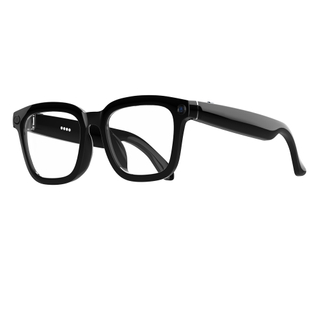
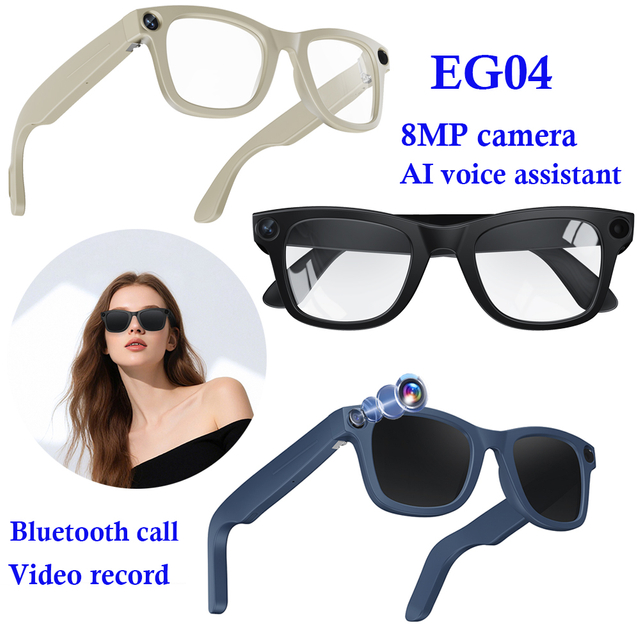
The 4P-Touch EG02 combines an 8MP camera with photo and video capture, voice recording, Bluetooth calls, music, AI interaction, object recognition, translation, touch controls, and Wi-Fi media transfer. Recorded files can be moved to a companion phone for reviewing, editing, or sharing. Its 42-gram TR90 frame and interchangeable lens options integrate these electronic functions into everyday-looking eyewear without turning the product into a bulky headset.
Where Smart Glasses Fit Naturally Into Daily Life
Travel and Outdoor Activities
Travel brings together several tasks that Smart AI Bluetooth Glasses handle well: taking quick photos, hearing directions, answering calls, requesting information, and using translation. A traveler can keep a phone in a pocket while walking, managing luggage, or viewing a landmark. During sightseeing, hiking, cycling, or casual outdoor recording, secure fit, accessible controls, suitable lenses, and reliable connectivity often matter more than a long feature list. The glasses are most useful when they reduce repeated phone checks rather than add another device that demands attention.
The EG02 supports commuting, travel, outdoor recording, and hands-free activities, with tinted, anti-blue-light, and photochromic lens options for different conditions. Physical buttons and touch controls provide more than one way to operate essential functions. Outdoor users should still evaluate frame stability, lens suitability, control access, and visibility while moving. Connected eyewear is not safety equipment, so drivers, cyclists, and pedestrians should avoid complex commands whenever full concentration is required.
Commuting, Content Creation, and Hands-On Work
During a commute, Smart AI Bluetooth Glasses can manage short calls, audio, spoken directions, and voice messages with fewer hand movements and screen checks. On public transport, open-ear playback is convenient, although volume should remain low enough to avoid disturbing others. While walking near traffic, environmental awareness is useful only when audio does not mask important sounds. The benefit is reduced friction, not complete independence from the phone.
For creators and workers, first-person capture supports product demonstrations, repair records, training sequences, craft processes, and behind-the-scenes footage. Both hands remain available, and recording can continue without repeatedly repositioning a camera. Before using the footage as formal documentation, the wearer should confirm framing, battery level, storage space, image quality, and permission to record. A short test clip can prevent an entire activity from being captured at an unusable angle.
Which Features Work Independently—and Which Need a Phone?
Local Functions Versus Connected Functions
Some Smart AI Bluetooth Glasses can take photos, record video, store files, adjust volume, or control playback directly through onboard buttons or touch sensors. These local functions may remain available when the phone is disconnected, but the exact offline feature set varies by model. Storage matters because camera files need a local destination before they are transferred. Buyers should verify each function rather than assume that the entire product works independently.
Calls, notifications, navigation, online translation, cloud-based AI, settings, and firmware updates commonly depend on a paired phone or app. Bluetooth usually handles audio and call communication, while Wi-Fi may transfer larger media files. On the EG02, the companion app synchronizes controls and moves photos, videos, and recordings to a phone. A stable smartphone connection therefore remains central to many advanced functions, even when the eyewear can record locally.
Do Not Confuse Audio Glasses With Display Glasses
The terms “smart” and “AI” do not guarantee an optical display. Many Smart AI Bluetooth Glasses deliver answers, directions, translations, and notifications through speakers or an app while using ordinary clear, tinted, or photochromic lenses. Visual subtitles, floating screens, in-lens maps, and virtual workspaces require dedicated projection hardware. Without that hardware, software alone cannot create a heads-up display.
This distinction prevents a common purchasing error. Camera-equipped glasses may recognize an object and describe it through audio without showing text over the scene. Spoken navigation can tell the wearer when to turn, but it does not place arrows inside the lens. Buyers seeking visual output should look for explicit display specifications rather than relying on broad descriptions such as “intelligent eyewear” or “AI-enabled glasses.”
Visual Module — Capability and Dependency Table
Function
Typical Hardware Required
Phone or Internet Dependency
User Output
Music and calls
Speakers, microphones, Bluetooth
Paired phone usually required
Open-ear audio
Photo and video
Camera and local storage
May work locally
Saved media files
AI questions
Microphones and AI software
Usually connected
Spoken answer
Object recognition
Camera and multimodal AI
Commonly cloud-based
Audio or app result
Media transfer
Wi-Fi or companion app
Smartphone required
Downloaded files
In-lens navigation
Optical display system
Usually connected
Visual text or arrows
The table shows why products in the same category can behave differently. A model may record locally but still need a phone for AI processing, calls, navigation, and file management. Smart AI Bluetooth Glasses should therefore be evaluated function by function rather than labeled simply “standalone” or “connected.” Understanding these dependencies also helps users judge how well the eyewear will work in areas with weak mobile service or limited internet access.
The Limits That Affect Real-World Use
Battery life, storage, comfort, and privacy can affect how practical Smart AI Bluetooth Glasses feel in daily use. Continuous video recording, calls, AI requests, and Wi-Fi file transfers consume more power than occasional operation, while limited storage may require users to transfer media before longer trips or work sessions. Comfort also depends on more than frame weight, as balance, lens type, heat, and pressure around the nose and temples influence extended wear. Camera resolution and speaker specifications cannot fully predict performance because lighting, movement, wind, traffic, and background noise also affect results. Camera-equipped models should be used responsibly: users should make recording clear, obtain permission when appropriate, follow local laws or workplace policies, and review app permissions, file storage, cloud processing, and deletion settings before capturing sensitive content.
How to Tell Whether They Are Worth Wearing
The best case for Smart AI Bluetooth Glasses is a repeated task, not novelty. Frequent hands-free calls, open-ear listening, first-person recording, travel translation, or voice support during manual work can create daily value. Someone who rarely uses these features may find that a phone and an ordinary audio device already cover the same needs. Convenience becomes worthwhile when it removes the same small interruption again and again.
Describe the intended routine before comparing models. Choose two or three frequent tasks and decide whether each requires audio, a camera, AI, or an actual display. One buyer may prioritize microphone quality and fit, while another needs fast camera controls, translation support, suitable lenses, and simple file transfer. This approach makes feature trade-offs easier to judge and prevents rarely used functions from influencing the decision too heavily.
Conclusion
Smart AI Bluetooth Glasses are most useful when their features match a repeated need, such as hands-free calls, open-ear audio, voice assistance, translation, or first-person recording. Their value depends less on the number of advertised functions than on comfort, battery life, phone dependence, privacy controls, and how reliably the glasses work in everyday situations. Shenzhen Yushengchang Technology Co.,LTDprovides smart eyewear designed around these practical uses, helping users stay connected, capture moments, and complete simple tasks with less interruption. A careful feature check remains the best way to choose the right model.
FAQ
Q: What can smart AI glasses do?
A: They can support hands-free calls, open-ear audio, voice assistance, translation, navigation prompts, object recognition, and first-person recording, depending on the available hardware and software.
Q: Do Smart AI Bluetooth Glasses need a smartphone?
A: Most models require a paired smartphone for calls, internet-based AI, navigation, app settings, and media transfers, although basic recording or playback may work independently.
Q: Do smart glasses display information inside the lenses?
A: Not always. Audio-focused models deliver responses through speakers, while visual subtitles, maps, and notifications require glasses equipped with a dedicated optical display.
Q: Can smart glasses take photos and record videos?
A: Camera-equipped models can capture photos and first-person video without holding a phone. Recording quality depends on lighting, stabilization, storage capacity, and camera specifications.
Q: Are camera-equipped smart glasses private and safe to use?
A: Users should make recording visible, obtain consent when appropriate, follow local laws, and review app permissions, cloud processing, storage, and file-deletion settings.