Choosing a Kids GPS Tracker Watch for school is not a matter of counting features. The right device must help a child contact trusted adults, give parents useful location information, and remain quiet enough for the classroom. Tracking accuracy, school mode, controlled calling, battery endurance, comfort, and dependable alerts work as a system; weakness in one area can undermine the rest. This guide explains how to evaluate those functions in real school routines, including the commute, lessons, sports, pickup changes, and emergencies, without treating a watch as a substitute for supervision or school safety procedures.
Key Takeaways
Prioritize dependable positioning, one-touch SOS, approved contacts, school mode, usable battery life, and a comfortable, durable design.
Judge location performance across outdoor, indoor, and weak-signal conditions instead of relying on a single accuracy claim.
Confirm carrier compatibility, app controls, privacy settings, alert behavior, and school policy before purchase.
Choose the simplest feature set that supports the child's routine without creating classroom distraction.
What Should a Kids GPS Tracker Watch Do at School?
A school-day watch has three core jobs. First, it should help a child reach a parent or guardian when plans change. Second, it should provide enough location context to help an adult distinguish a normal delay from an unusual event. Third, it should avoid interrupting teaching. Entertainment features may be attractive in a store listing, but they do not solve these three needs and may make school acceptance harder.
The routine matters. A child who travels by school bus may need arrival and departure notifications, while a child who walks several blocks may benefit more from route history and reliable outdoor GPS. A child collected by different caregivers needs a controlled contact list. A younger student may need a large, obvious SOS control, whereas an older child may value discreet voice messaging. Start with these situations, then map features to them.
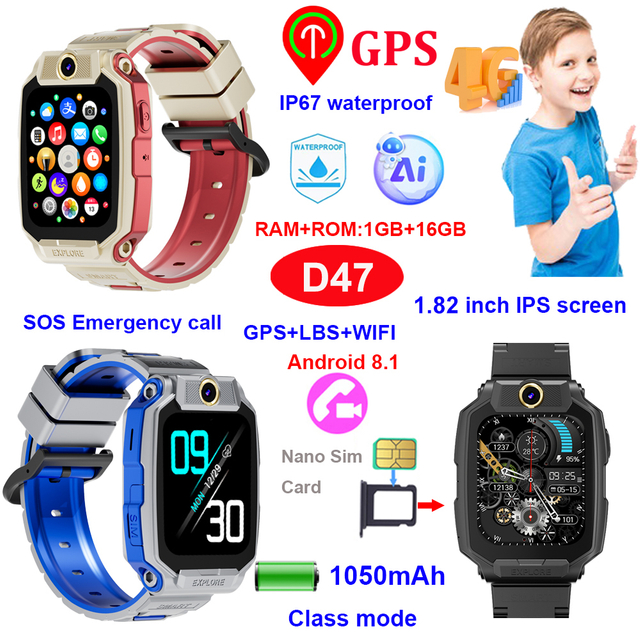
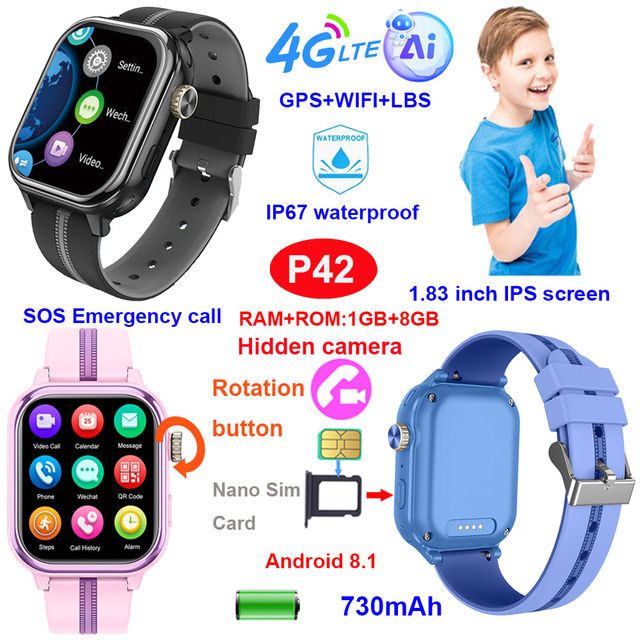
A school-ready 4G GPS watch provides a useful example of this focused approach. The D35Wifi combines GPS, Wi-Fi, and LBS positioning with two-way communication, SOS, safety zones, route history, class mode, rejection of unknown calls, and an IP67-rated enclosure. Its design also avoids social-media applications, which is relevant when distraction control is a primary requirement.
Reliable Positioning Requires More Than GPS
Parents often use “GPS” as shorthand for all location tracking, but a wearable may combine several positioning methods. Satellite GPS is generally most useful outdoors with a clear view of the sky. Wi-Fi positioning can improve location estimates around buildings where satellite reception is weaker. Cellular or LBS positioning can provide broader context when more precise signals are unavailable. The app may switch among these sources automatically.
That means an accuracy number by itself is not enough. Buyers should ask how the watch behaves at the school entrance, inside a large building, on a bus, under tree cover, and in a dense urban street. They should also ask how frequently the watch reports its position. Very frequent updates can consume more battery and mobile data, while long intervals may leave an outdated point on the map. A sensible product lets the family balance update frequency with endurance.
The app should show when a position was last refreshed. A clear timestamp prevents an old point from being mistaken for a live location. Route history should be readable rather than simply extensive. A short, understandable record of the trip from home to school can be more valuable than a large archive that is difficult to interpret.
No consumer wearable can guarantee a perfect position in every environment. Building materials, network coverage, weather, device orientation, and the available positioning source can all affect results. Treat the watch as a decision-support tool: if a child is late, use the location, last-update time, planned route, communication tools, and normal school contacts together.
School Mode Must Reduce Distraction Without Removing Safety
A school mode, class mode, or do-not-disturb schedule should silence nonessential functions during lessons. The important question is not whether the feature exists, but what remains available while it is active. Parents should verify whether SOS still works, whether guardians can see location updates, whether incoming calls are blocked or only silenced, and whether scheduled restrictions resume automatically after weekends or holidays.
The strongest configuration is usually predictable. Parents set school hours in the companion app, the watch limits ordinary interaction during those times, and emergency functions remain available. If a child can easily disable the schedule, the control may not achieve its purpose. If the schedule is too rigid, it may interfere with early dismissal, after-school activities, or legitimate contact during lunch.
School policy comes first. Some schools allow a GPS watch only when it stays in a bag or operates in silent mode. Others treat connected watches like phones and prohibit them during the day. Families should explain the device to the child, agree on when it may be used, and provide the school with relevant information if required. A school mode supports compliance; it does not create permission.
SOS and Communication Should Be Simple and Controlled
In a stressful moment, a complicated menu is a poor emergency interface. A kids smartwatch with SOS should use a clearly identifiable control that a child can operate quickly. The family should test the exact action together: how long the button must be pressed, which contacts are called, what notification appears, and what happens if the first contact does not answer.
Two-way voice calling is valuable for pickup changes, a missed bus, or an unexpected closure. Voice messages may be useful when a call is not appropriate. Video calling can provide context but also uses more battery and data and may be restricted at school. The best combination depends on the child's age and routine.
Approved-contact controls reduce unwanted communication. Confirm that parents can add and remove contacts, that unknown callers can be rejected, and that the child cannot bypass those restrictions without authorization. Contact management should also cover caregivers, grandparents, or coaches who genuinely need access. More contacts are not automatically better; a short, current list is easier for a child to understand.
Emergency features require practice. A child should know that SOS is for urgent situations and should also know ordinary alternatives: approach a teacher, driver, crossing guard, or other trusted adult. Regular low-pressure tests help reveal whether the child can hear the watch, whether the microphone works in outdoor noise, and whether the guardian app receives alerts promptly.
Geofences Should Reflect Real Boundaries
A GPS watch with geofencing lets a guardian create a virtual area and receive a notice when the watch enters or leaves it. Useful zones may include home, school, a caregiver's house, or an activity center. The feature is most effective when zones are large enough to account for normal positioning variation but small enough to represent a meaningful transition.
An extremely tight boundary around a school door may produce false alerts as the location estimate moves. A zone covering an entire neighborhood may report too late to be useful. Families should test a new boundary for several routine days before treating every notification as significant. They should also consider the route: a bus may pass near a zone without stopping, and a sports field may sit outside the main school boundary.
Alert speed depends on position update intervals and network availability. Entry or exit notifications are therefore not the same as continuous surveillance. A good family plan defines what to do after an unexpected alert: first check the timestamp and battery status, then try the watch, then contact the school or designated adult if necessary.
Battery Life Must Cover the Real Day
Published battery figures are difficult to compare unless the test conditions are known. GPS refresh frequency, cellular signal strength, Wi-Fi scanning, screen use, voice or video calling, and temperature all affect runtime. A watch that lasts several days with light use may require much more frequent charging under continuous tracking and calling.
For school use, the practical target is not the longest advertised standby time. It is enough reserve to cover the full commute, school day, after-school activity, and trip home with a margin for delays. Parents should run a realistic trial using the intended update frequency and normal communication. A low-battery alert in the parent app is especially useful because a child may overlook the watch display.
Charging should become part of a stable routine. Placing the charger in one location and charging at the same time reduces forgotten devices. Buyers should inspect the connector and cable design, confirm replacement availability, and check whether the watch can be restarted remotely if the system stops responding. Battery performance will change over time, so the family should review it periodically rather than relying on the first week's result.
Comfort, Water Resistance, and Everyday Durability
A tracker only works when it is worn. Weight, case size, strap flexibility, buckle security, and skin comfort matter throughout a long school day. A watch that rotates on the wrist can be hard to operate and may affect sensor or antenna orientation. A strap that is too tight causes discomfort; one that is too loose may catch on objects or be removed easily.
Water-resistance ratings need careful interpretation. IP67 commonly indicates protection under defined laboratory conditions, but it does not make every device suitable for swimming, hot showers, salt water, or high-pressure water. Families should follow the product's care instructions, keep charging contacts dry, and inspect the case after impacts.
Children encounter desks, playground equipment, bags, dust, sweat, and rain. A raised bezel, resilient strap, secure charging contact, and readable screen can matter more than decorative finishes. For procurement or distribution, sample testing should reproduce the intended use: repeated buckle operation, common drops, screen visibility outdoors, button access with small hands, and comfort over a complete day.
Privacy and App Control Deserve Equal Weight
Location data is sensitive. Buyers should understand who can create an account, who can view the child's location, how guardians are invited, how passwords are reset, and how a lost phone or watch is removed from the account. Default passwords should be changed, and account sharing should be limited.
The guardian app should make important controls clear: contacts, safety zones, school schedules, location refresh, battery level, alerts, and device status. Families should review permissions and avoid giving more people access than necessary. When a watch changes owners, the previous account and stored data should be removed according to the supplier's instructions.
For schools or organizations considering multiple devices, governance matters as much as hardware. They need a defined administrator, an enrollment and removal process, rules for data access, and a response plan for lost devices. Privacy claims, server arrangements, and applicable child-data obligations should be assessed for the target market rather than assumed from a generic product description.
A Practical Feature Decision Framework
Feature
School-day question
Warning sign
Positioning
Does it combine suitable location sources and show the last update time?
A precise claim without conditions or timestamps
School mode
Do SOS and essential guardian controls remain available?
The child can easily bypass restrictions
Communication
Can guardians limit calls to approved contacts?
Open calling or unclear contact permissions
SOS
Can the child operate it quickly and can the family test the alert path?
A multi-step emergency process
Geofence
Can zones and notifications be tuned to the real route?
Frequent unexplained false alerts
Battery
Does it cover the real day under intended settings?
Standby claims with no usage context
Durability
Is the watch comfortable and appropriate for routine exposure?
“Waterproof” used without a defined rating or limitations
App and privacy
Are access, passwords, data removal, and device status manageable?
Shared logins or unclear ownership controls
The Kids GPS Tracker Watch range can help buyers compare form factors and functions, while the children's GPS solution overview explains how positioning, communication, SOS, geofencing, unknown-call blocking, and class mode fit together. Compare verified specifications model by model rather than assuming every watch in a category has identical functions.
Common Buying Mistakes
The first mistake is choosing by feature count. A device with games, media, and numerous apps may be less suitable for school than a simpler watch with dependable essentials. The second is assuming that “GPS” means constant, exact indoor tracking. Positioning is conditional, and a transparent interface is more useful than an absolute promise.
The third mistake is ignoring the service layer. Cellular compatibility, SIM arrangement, data plan, app availability, server access, and target-market bands can determine whether the hardware works at all. The fourth is treating an IP rating as permission for every water activity. The fifth is setting up the watch without involving the child. Children need to practice calling, charging, responding to rules, and asking a trusted adult for help.
B2B buyers should also avoid approving a product solely from a specification sheet. Evaluate samples in the target country, with representative SIMs, school routes, buildings, and guardian phones. Confirm packaging, manuals, app language, supported bands, account management, and after-sales procedures before scaling an order. 4P-Touch presents multiple device and solution categories, but final selection should always follow verified model specifications and local requirements.
Conclusion
The best school watch is the one that performs a few essential tasks consistently: it provides understandable location context, enables fast contact with trusted adults, preserves emergency access, and stays unobtrusive during lessons. School mode, SOS, approved contacts, multi-source positioning, practical battery life, comfort, and clear app controls should be assessed together. Families should test the device on the real route and align its use with school policy. For business buyers, 4P-Touch offers relevant product and solution information, but carrier compatibility, target-market obligations, and model-specific details still require confirmation before purchase.
FAQs
What is the most important feature in a Kids GPS Tracker Watch?
There is no single feature that works alone. Reliable location context, a clear last-update time, controlled communication, and a child-friendly SOS process form the core system. School mode and sufficient battery life ensure those functions remain useful throughout the day.
Does a GPS watch track accurately inside a school building?
Indoor performance varies because satellite signals may be weak. Watches that combine GPS with Wi-Fi and cellular or LBS positioning may provide better context, but building construction, nearby networks, and update settings still affect results.
Should SOS work during school mode?
For most school-use cases, emergency access should remain available even when entertainment and ordinary communication are limited. Buyers must verify the exact behavior of the specific model and test it after setup.
How large should a school geofence be?
It should cover the meaningful school area while allowing for normal location variation. Test the boundary over several routine days and adjust it if buses passing nearby or indoor positioning changes produce false notifications.
Is IP67 enough for school use?
It can be suitable for common exposure such as dust or accidental splashes under specified conditions, but it should not be interpreted as universal protection for swimming, hot water, chemicals, or repeated high-pressure exposure.
How should parents introduce the watch to a child?
Explain when calls and SOS are appropriate, practice the controls, agree on school rules, and establish a charging routine. The child should also know that the watch complements—not replaces—teachers, caregivers, and other trusted adults.